Race Link Live

Race Link Core

Course, traffic and safety in the vehicle.

Race Link Core gives drivers course, traffic, passing, hazard, caution and SOS information. It links each state to the assigned driver, vehicle and class, reports delivery and acknowledgements to Race Control, and preserves records through gaps in connectivity.

46 capabilities

Core feature set.

Configured by event across seven operating areas. Availability depends on hardware, coverage, communications and operating rules.

01Identity, assignment + readiness6 capabilities
  • Driver, vehicle, class and event assignment
  • QR enrollment and device provisioning
  • Event configuration and course synchronization
  • Course-file integrity checks
  • Readiness, health and diagnostics
  • Driver display and physical control states
02Course intelligence + compliance10 capabilities
  • Live GNSS tracking
  • Race-mile and course progress
  • Virtual checkpoints
  • Speed-zone approach, active and clear warnings
  • Speed-zone evidence
  • Pit and neutral-zone awareness
  • Wrong- or off-course warning
  • Official-grade speed reports and exports
  • Wrong-way and course-cut candidates
  • Waypoint, danger and neutralization guidance
03Traffic + class-aware passing8 capabilities
  • Traffic-ahead awareness
  • Nearest eligible vehicle targeting
  • Vehicle number, distance, speed, freshness and closing rate
  • Class-aware push-to-pass rules
  • Targeted pass requests
  • Pass acknowledgement, timeout and cooldown
  • Rules-based no-yield compliance candidates
  • Pass-workflow evidence
04Driver safety8 capabilities
  • Physical SOS control
  • Driver-selected medical, mechanical, crash or rollover report
  • Driver-reported hazard, crash and stopped vehicle
  • Stopped-vehicle-ahead warning
  • Course-relative left or right stopped-vehicle location
  • Full-course cautions and all-clear
  • Map-based hazard advisories
  • Driver acknowledgement states
05Race Control coordination6 capabilities
  • SOS acknowledgement and response coordination
  • Incident lifecycle and operator review
  • Live Race Control safety map
  • Stage and route red-flag states
  • Crew OK, road-open and road-blocked status
  • Bidirectional Race Control and team messaging
06Resilient communications6 capabilities
  • Store-and-forward synchronization and backfill
  • Configured primary network or radio source
  • Vehicle-to-vehicle safety mesh backup
  • Authenticated position and emergency relay
  • Core Lite independent race connectivity and satellite fallback
  • Coverage planning, failover, staged fleet updates and recovery controls
07Evidence + synchronized review2 capabilities
  • Local track and event-evidence logging
  • Synchronized incident, timing, telemetry and available video review

System context

Each Core unit is assigned to a vehicle, driver, class and course.

That assignment determines which traffic matters, which passing rules apply, which course zones are active and where alerts should be delivered. Race Control works from the same vehicle and course context.

  • AssignmentDriver · vehicle · class
  • PositionCourse · race mile · zone
  • Current stateTraffic · hazard · race status
  • Message statusReceived · displayed · acknowledged

Driver interface

Driver display states.

Core uses high-contrast screens, short labels and physical controls so drivers can read and respond with minimal interaction.

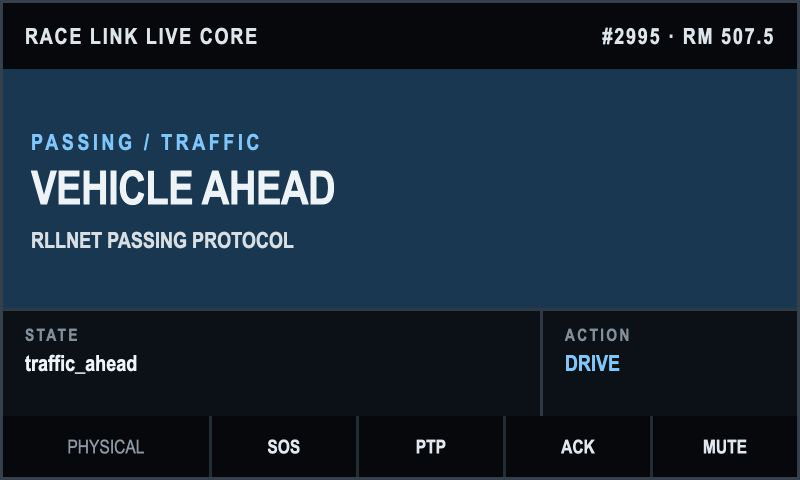
Current Race Link Core vehicle-ahead driver state
01 · Traffic ahead

Vehicle-ahead state and required action.

Core identifies eligible traffic using the assigned vehicle, class and course. Distance, speed, freshness and closing information can be included when available.
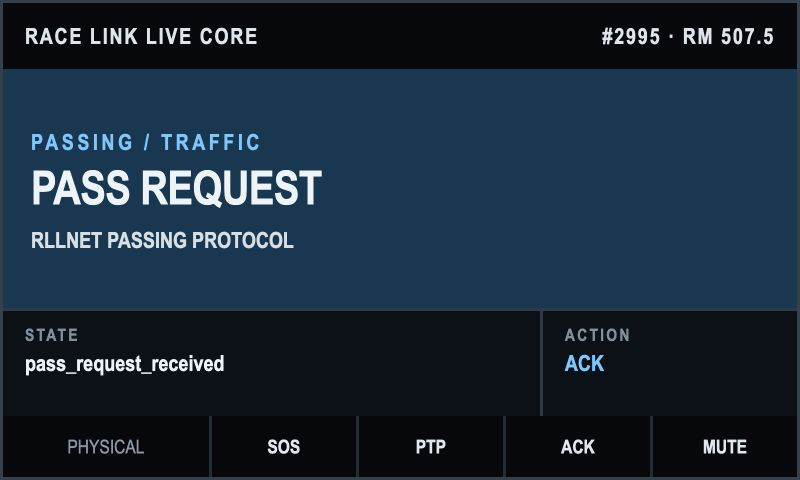
Current Race Link Core pass-request driver state
02 · Passing

A pass request from a specific vehicle.

The display shows the request and the physical action available to the driver. Acknowledgement, timeout and cooldown states are retained for review.
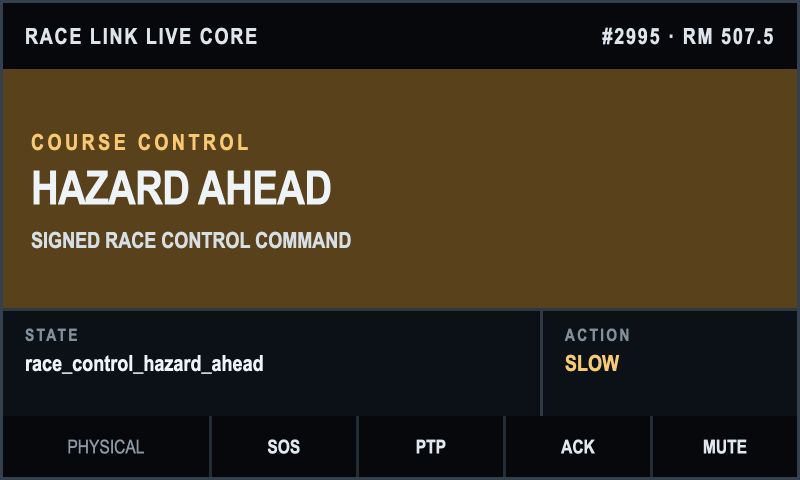
Current Race Link Core Race Control hazard-ahead state
03 · Course control

A Race Control hazard with a required action.

Signed course-control commands identify the active condition and tell the driver whether to slow, continue or acknowledge.
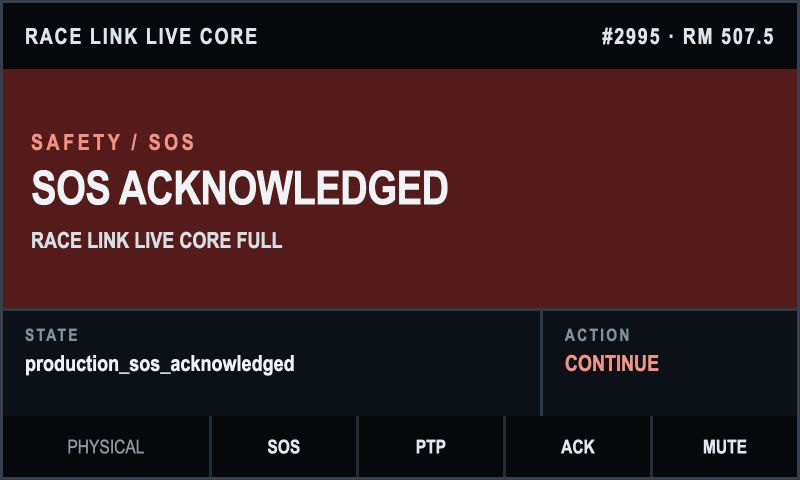
Current Race Link Core SOS-acknowledged driver state
04 · SOS

Race Control acknowledgement returned to the driver.

The display keeps the emergency status visible and confirms when Race Control has acknowledged the report.

Operating examples

What Core does during the race.

These examples show how vehicle assignment, driver displays and Race Control status work together.

01

A faster vehicle closes on traffic

Core selects eligible traffic and applies the event's passing rules.

  • Vehicle-ahead identification
  • Targeted request and acknowledgement
  • Timeout, cooldown and event record
02

A vehicle stops beside the course

Core warns approaching drivers with distance and left/right course position.

  • Driver or Race Control report
  • Location-specific warning
  • Acknowledgement and incident record
03

Primary connectivity is unavailable

Core retains local course functions and queues records for synchronization.

  • Local course and zone states
  • Configured mesh or satellite path
  • Store-and-forward synchronization

Race Control status

Delivery and acknowledgement are visible.

For supported commands, Race Control can see whether a message was issued, received by Core, displayed to the driver, acknowledged and cleared.

  1. 01Issued

    Race Control targets the vehicle, course area or field.

  2. 02Received

    Core reports that the instruction reached the vehicle.

  3. 03Displayed

    The assigned state is presented to the driver.

  4. 04Acknowledged

    Driver interaction returns to Race Control when required.

  5. 05Cleared

    The state closes with an authorized record.

Limited connectivity

Local functions continue and records wait for a connection.

An event can configure primary connectivity, an authenticated vehicle safety mesh, satellite fallback, local storage and store-and-forward synchronization.

01

Local functions

Configured course and driver functions that do not require a remote response remain available.

02

Connection status

The display distinguishes local information, delayed synchronization and unavailable remote functions.

03

Queued synchronization

Stored records are sent over an approved path when connectivity returns.

Review records

Incident, telemetry, timing and video on the same timeline.

Core records can be aligned with position, course state, driver input, Race Control actions, timing sources and available vehicle video for operations and officiating review.

  • Incident and pass-request status
  • Telemetry and course-state records
  • Timing-source continuity
  • Available video aligned to event time

Configurations

Core and Core Lite.

Core includes the driver interface and local course functions. Core Lite provides vehicle position, event state and independent race connectivity where the full display is not required.

Driver system

Race Link Core

Driver display, physical controls, local course functions and communication with Race Control.

  • Driver-visible race states
  • Traffic, passing and safety controls
  • Local operation and event records
Compact connectivity

Race Link Core Lite

Vehicle position, event state and independent race connectivity without the full driver display.

  • Position and event state
  • Primary and backup communications
  • Satellite fallback options

Race Link Core

Review Core for your race program.

We will cover vehicle installation, classes, course files, communications, safety procedures and Race Control staffing.

Schedule a Core review